
Indoor cycle training has never been so popular and Wahoo is one of the most respected names in the business. Known for its range of direct-drive trainers, which integrate with a bike’s gearing system, Wahoo launched an alternative with the Kickr Rollr back in 2022.
Blending elements of a traditional roller setup with the ‘smart’ features that you’d associate with a connected bike trainer, the original Kickr Rollr lacked an integrated power meter. It meant that users needed to connect their own meter to access data and use systems such as Zwift. Now, however, that has been changed with a revised Kickr Rollr. So should this be your next indoor training option to get you through winter? We’ve been on board to see what it’s like.
Sphere Score
For
- No need to detach rear wheel
- Easy set up
- Ideal for multiple users with different bikes
Against
- Takes up quite a bit of space in a room
- Will wear our rear tyre
- Some niggles during setup
Tech specs
- £549.99
- Front tyre gripper
- Power meter included, measures speed, distance and approximate power
- Dual roller design
- Maximum 1,500W output
- 10 per cent simulated incline
- ANT+, ANT+ FE=C, Bluetooth and Direct Connectvity
- 23kg weight
What does the Wahoo Kickr Rollr have to offer?
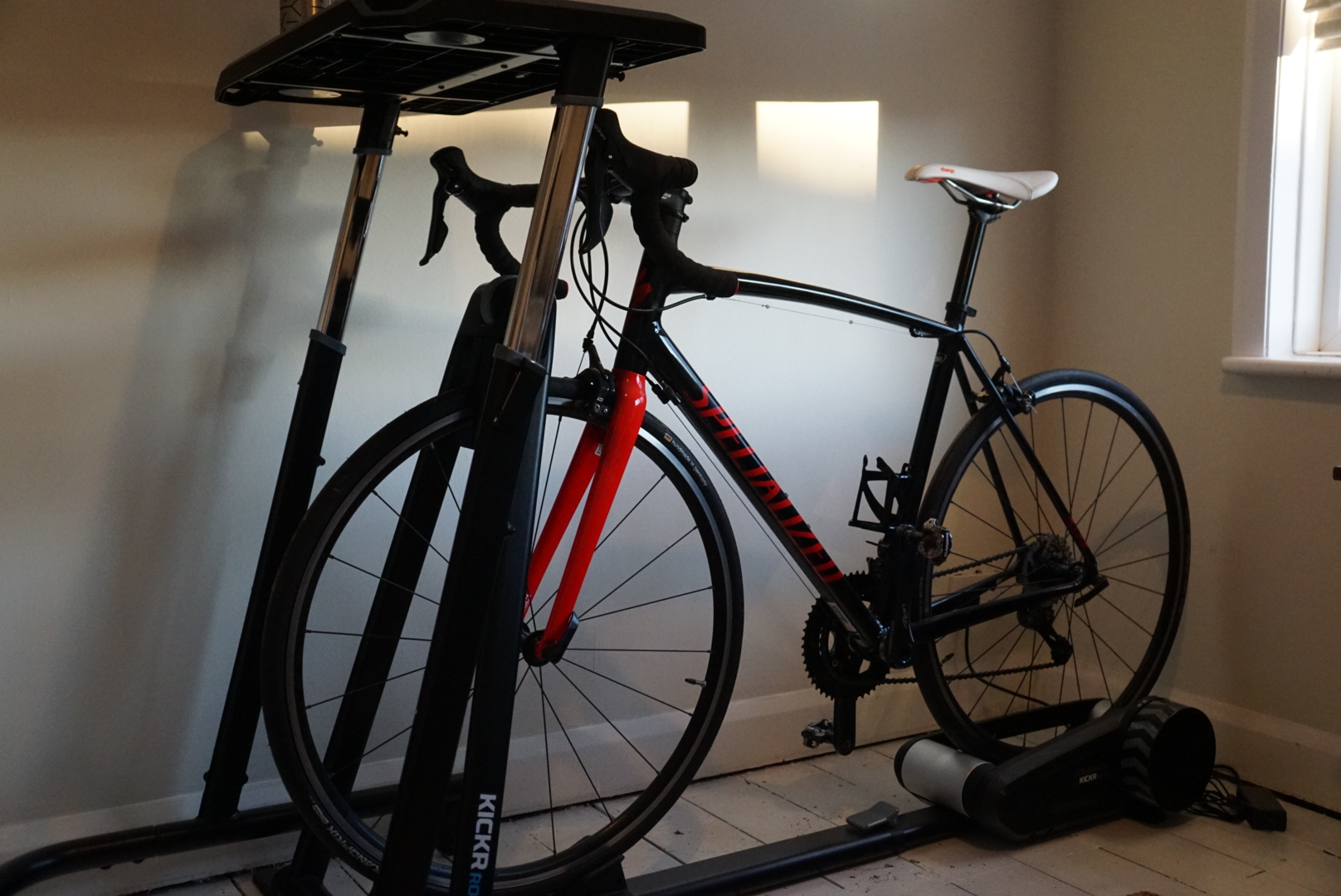
The Wahoo Kickr Rollr differentiates itself from other smart trainers by its ability to use an entire bike without the removal of the rear wheel. With a direct drive trainer, the rear wheel is removed and the system connected via the bike’s chain. However, with the Kickr Rollr’s dual-roller design, the bike simply sits on the two rear rollers with the front wheel held in place by a vice-like clamp.

With a maximum power output of up to 1,500 watts, a maximum simulated grade of 10 per cent and a minimum simulated grade of -10 per cent, the Wahoo Kickr Rollr has enough capacity to deliver a realistic riding feel. In comparison, the popular Kickr Core direct drive setup brings a maximum output of 1,800 watts, as well as a maximum incline of 16 per cent and a maximum decline of -10 per cent.
The good news is that because there’s now an integrated smart meter – unlike the previous Kickr Rollr – you can instantly get it up and running before connecting to apps like Zwift. There is a variety of connectivity options, too, though Bluetooth is likely to be the one that most people use. Wahoo says that it supports both iPhone and Android devices, too, as well as macOS and Windows PC.

The Kickr Rollr is also compatible with nearly all types of bicycles thanks to a clever sliding adjustment at the base of the trainer. It means that once the bike’s front wheel is in place, you can adjust the rear rollers to ensure that they sit directly underneath the rear wheel. As a result, it should be able to cater for all types of models and sizes. However, the main limiting factor is the front ‘gripper’ – it can take tyres of up to 53mm.
As with other Wahoo products, the Kickr Rollr is also compatible with a range of the brand’s accessories. These include the Kickr Desk – which we’re using for laptop placement – as well as others like the Kickr Headwind fan.
Set up – what is the Wahoo Kickr Rollr like?
Setting the Wahoo Kickr Rollr is pretty straightforward. It arrives in a big, heavyweight box, so it’s worth unpacking somewhere with plenty of space. However, once you’re in, you’re presented with a series of tubes, the main dual-roller unit and the wheel grabber section. Everything screws together solidly enough, though we did encounter that some of the tubing was a little misshapen out of the box, which meant that elements required a little ‘persuasion’ to get them to fit. However, with everything bolted together using the included Allen keys, the Kickr Rollr provides a sturdy base.

An associated Wahoo app is also available and can help with setup, as well as provide some useful history information and riding data.
It’s dead easy to get your bike hooked up, too. We’re on a trusty Specialized Allez Sport, which feels like a good ‘standard’ road bike to use. The rear wheel fits snugly on those back rollers and it’s not hard to adjust the length of the unit itself to make sure that the rubber is in perfect contact with the mechanism. We found it easiest to get the front wheel locked in place before adjusting the rest. Once in place, the whole setup feels very secure. We always give the front tyre grabber a quick check before each use to make sure it’s locked in properly, however.

There’s a simple plug to provide power to the system, and it’s on a good length of cabling, so you don’t need to be too near an outlet. However, we’d still recommend giving yourself a good amount of space around the unit to help when you’re getting on and off.
Riding – what is the Wahoo Kickr Rollr like?
Get aboard the Wahoo Kickr Rollr – it takes a bit of a leap up – and things feel quite natural to begin with. Powered up, it’s simple to connect the Kickr Rollr to whatever external setup you’re using. We’re on a Mac and, within seconds, the Kick Rollr had automatically connected via Zwift to the computer. Each time we’ve booted the whole system up since the process has been seamless, too.

Start rolling, and there’s some hefty initial resistance, but you soon get into the swing of things. It’s a very natural and realistic sensation being on the Kickr Rollr, with the rear tyre moving about ever-so-slightly from side to side.
It’s not all that noisy, either; we had the Kickr Rollr upstairs and it’s a similar level of sound to a washing machine being used in another part of the house, so hardly disruptive. Linked with Zwift, the Kickr Rollr intelligently adjusts for gradient and we’ve found that the changes between different levels are seamless.

When going from high-intensity sections to more leisurely paces, the Kickr Roller can be a little trickier to level out. For instance, if you’re sprinting one moment and maintaining a level pace the next, it can be hard to find a balance. The flywheel spins down quickly, so you sometimes need to put a little more effort into maintaining a pace than you might expect.
Of course, given that the bike is mounted directly on the rollers, you will wear out that rear tyre eventually – so you may want to put some cheaper rubber on there to avoid ruining your good road tyres.
To finish
If you’re a multi-bike household, then the Wahoo Kickr Rollr will make complete sense. It’s much easier to chop and change between bikes – or even go from a road ride to some indoor training – than a direct drive system, and there feels like less risk of twisting your frame, too.
While the previous Kickr Rollr was held back by its lack of an in-built power meter, this new system is no longer as limited. It now feels like the setup that it was always meant to be and one that we can see being appreciated by a lot of riders.


Leave a Reply